Unicode
Knowledge Round Table 31
Great Circle Route တွေကို GPS နဲ့ ECDIS တွေမှာ
ထည့်သွင်းခြင်း။
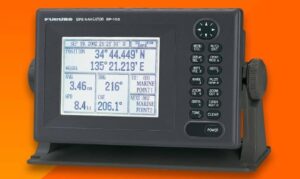
***GC sailing မှာ calculation လုပ်ပြီးရရှီတဲ့ way points တွေကို GPS မှာ route တခုထည့်ရအောင်။
GC calculation နဲ့ တွက်ပြီးရလာတဲ့ way points
တွေကို GPS မှာ အားလုံးထည့်သွင်းရန်မလိုပါ။
passage plan က way points တွေထဲမှ GC စတင်အသုံးပြုမယ့်( initial position) နဲ့ GC end point
(final position) ကိုသာ ထည့်သွင်းရမှာဖြစ်ပါတယ်။
intermediate way points တွေကိုထည့်သွင်းပေးစရာမလိုပါ။
*(Paper charts တွေမှာ ထည့်သွင်းစွဲသားရပါမည်။)*
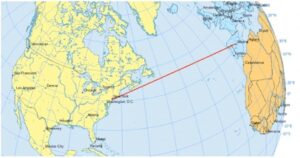
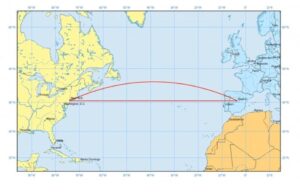
(Marcator Chart မှာတော့ GC track က curve အနေနဲ့တွေ့ရပါမယ်။)
***ကျန်သောDeparture Berth to (GC initial position)
GC end point (final position) to Arrival Berth
way points တွေကိုတော့ ထည့်သွင်းပေးရပါမယ်။
Route ကို Activate လုပ်ရင်တော့ GPS Navigator
ကို Rhumb line mood ကို စတင်သုံးပြီး( GC initial position) ရောက်မှသာ GC mood ကို activate လုပ်ရန်လိုပါတယ်။
GC end point ရောက်ရင်တော့ Rhumb line mood
ကို activate ပြန်လုပ်ပေးရန်လိုပါတယ်။
GPS အများစုက way points တွေနဲ့ route ကို create လုပ်ပြီး navigate လုပ်ရင် Leg တွေကို
sailing mood မှာ individual command ပေးလိုအဆင်မပြေပါဘူး။
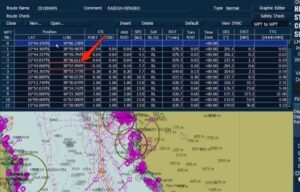
ဒါပေမယ့် ECDIS နဲ့ GC sailing ကိုသုံးရင်တော့
Table Editor မှာ way points တွေကို Rhumb
line mood,. GC mood ဆိုပြီး user option
အနေနဲ့ ရွေးပြီးသုံးနိင်ပါတယ်။
ကျေးဇူးတင်ပါတယ်။
Make. believe
Maritime Pro.
Zawgyi
Knowledge Round Table 31
Great Circle Route ေတြကို GPS နဲ႔ ECDIS ေတြမွာ
ထည့္သြင္းျခင္း။
***GC sailing မွာ calculation လုပ္ၿပီးရရွီတဲ့ way points ေတြကို GPS မွာ route တခုထည့္ရေအာင္။
GC calculation နဲ႔ တြက္ၿပီးရလာတဲ့ way points
ေတြကို GPS မွာ အားလုံးထည့္သြင္းရန္မလိုပါ။
passage plan က way points ေတြထဲမွ GC စတင္အသုံးျပဳမယ့္( initial position) နဲ႔ GC end point
(final position) ကိုသာ ထည့္သြင္းရမွာျဖစ္ပါတယ္။
intermediate way points ေတြကိုထည့္သြင္းေပးစရာမလိုပါ။
*(Paper charts ေတြမွာ ထည့္သြင္းစြဲသားရပါမည္။)*
(Marcator Chart မွာေတာ့ GC track က curve အေနနဲ႔ေတြ႕ရပါမယ္။)
***က်န္ေသာDeparture Berth to (GC initial position)
GC end point (final position) to Arrival Berth
way points ေတြကိုေတာ့ ထည့္သြင္းေပးရပါမယ္။
Route ကို Activate လုပ္ရင္ေတာ့ GPS Navigator
ကို Rhumb line mood ကို စတင္သုံးၿပီး( GC initial position) ေရာက္မွသာ GC mood ကို activate လုပ္ရန္လိုပါတယ္။
GC end point ေရာက္ရင္ေတာ့ Rhumb line mood
ကို activate ျပန္လုပ္ေပးရန္လိုပါတယ္။
GPS အမ်ားစုက way points ေတြနဲ႔ route ကို create လုပ္ၿပီး navigate လုပ္ရင္ Leg ေတြကို
sailing mood မွာ individual command ေပးလိုအဆင္မေျပပါဘူး။
ဒါေပမယ့္ ECDIS နဲ႔ GC sailing ကိုသုံးရင္ေတာ့
Table Editor မွာ way points ေတြကို Rhumb
line mood,. GC mood ဆိုၿပီး user option
အေနနဲ႔ ေ႐ြးၿပီးသုံးနိင္ပါတယ္။
ေက်းဇူးတင္ပါတယ္။
Make. believe
Maritime Pro.